Technology
by Jane Hurst
Many apps are created with one thing in mind, and that is to help make your life a little bit easier.
There are thousands of apps out there though, and it can be difficult
to figure out which ones you can actually use, and which ones you don’t
need to bother with. Here are some of our favorites, and we recommend these apps for all Android users.
This app has more than 5 million downloads and is considered one of the most popular of its kind.
It has a smart cloud synchronization that allows users to create and
manage lists either on web app or mobile device, and sync them with a
number of devices. With this app users can also share their lists with friends and family and collaborate on shopping together.
Price: there is a free version and a paid one for $2.98.
If you are forgetful and need to take notes for reminders, this is the app for you. Color-code all of your notes, take photos using the app, and even transcribe recorded voice messages.
Price: Free.
Typing on a small device can be difficult. If you want a better keyboard option for your device, this is it. Once you get used to using it, you will find that you have better speed and accuracy with your typing.
Price: Free version and paid for $0.99.
You want access to information, and you want it now. That is what you will get from this app. This is a new way to share information with others all over the world. It’s like a virus. Once information is shared, it spreads from user to user.
Price: Free.
Don’t you just hate how much time you end up wasting browsing online? Change all of that with this app.
You can click on a link and the app will load the link in a bubble in
the background, so you can keep on browsing while it loads.
Price: Free and pro version for $4.04.
If you download torrents, you need this app. It is a great peer-to-peer app that lets you browse and download torrents quickly and easily. It has all of the same great features as the expensive torrenting programs.
Price: Free lite version and paid version for $4.99.
Do you hate having to stop in the middle of something just to send a message? You won’t have to do this any longer when you use HoverChat. You can watch a movie and have a conversation at the same time, and you can customize your messaging windows.
Price: $3.99 and a free promo app.
Never miss a text again with this app. Even if you can’t access your phone (during meetings, classes, etc.) you can still see them on your tablet or computer. It even works with Gmail.
Price: Free.
This is an awesome anti-theft app that everyone should have.
In addition to tracking stolen devices, you can also use the app to
control the stolen devices through the website or with a text message. You can wipe all of the information from the device, lock it using a special code, have the alarm go off, and more.
Price: Free trial, and a one-time upgrade fee of 2.99€.
If you love art, this app will allow you to be able to look at some of the most famous works of art in the world. Muzei gives you wallpapers for your home screen, and you get a different piece every day.
Price: Free.
If you prefer having custom widgets for homescreens, this app will let you create them. Choose from a variety of skins, and start creating. You can decide what the widgets display, from low battery to missed calls to weather and much more.
Price: Free.
This app will put all of your apps on the lockscreen, so everything is in one convenient location. It can tell when you are working, at home, driving, etc., and gives you the apps you tend to use most often for these and other activities.
Price: Free.
You can use this app to get into your smartphone’s LED to get custom
notifications, as long as your phone has an LED light that alerts you to
notifications. It will give you a special color for texts, emails, phone calls, etc., and it can even let you know when your battery is running down.
Price: Free lite version and paid one of $2.49.
![Lux1]()
If you hate a screen that is too bright or too dark, you can use this app to change the brightness settings. This comes in pretty handy when you need more or less brightness depending on the light conditions you are in.
Price: Free and $3.80.
![Capture]()
This is another app that will let you customize your phone based on actions. You can set up customized actions for apps, time, your location, various events, shortcuts, and a whole lot more. You can even use this app to create and sell apps.
Price: $2.99.

![Capture]()
Do you want to know who is calling just by the way your phone rings? You can do this, and a lot more, with this automation app.
You can customize how your phone works based on all kinds of factors,
including your location, who is calling, battery life, and more.
Price: $9.99.
![sky-map-android-apps-screenshot-970x546]()
Astronomy lovers will go crazy for this app from Google. Point it at the sky, and it will tell you what constellation it is pointed at. This is a great tool to help you learn more about the constellations.
Price: Free.
![yahooweather1]()
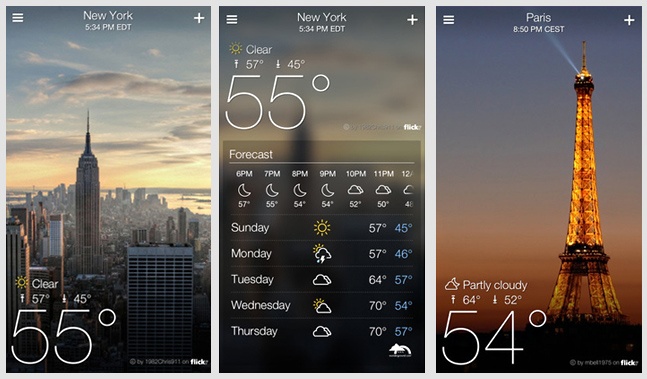
Always be ready for the weather by downloading this popular app. You will be able to find out what the weather is going to be like, which is great so you can know how to dress accordingly.
Price: Free.
![Instagram-3-0-iOS-Puts-Your-Photos-on-a-Map-2]()
If you don’t already have this app, get it now. You can do a lot with your photos by using the filters, and you can instantly share your photos with friends and family.
Enjoy videos anywhere, and at any time with this app. You can watch videos in any file format. Cost: Free.
by Jane Hurst
Many apps are created with one thing in mind, and that is to help make your life a little bit easier.
There are thousands of apps out there though, and it can be difficult
to figure out which ones you can actually use, and which ones you don’t
need to bother with. Here are some of our favorites, and we recommend these apps for all Android users.
Notes & Lists
1. BuyMeaPie – Grocery Shopping List
Download link: Free | PaidThis app has more than 5 million downloads and is considered one of the most popular of its kind.
It has a smart cloud synchronization that allows users to create and
manage lists either on web app or mobile device, and sync them with a
number of devices. With this app users can also share their lists with friends and family and collaborate on shopping together.
Price: there is a free version and a paid one for $2.98.
2. Google Keep – Create Custom Notes and Lists
Download link: FreeIf you are forgetful and need to take notes for reminders, this is the app for you. Color-code all of your notes, take photos using the app, and even transcribe recorded voice messages.
Price: Free.
Productivity
3. Swype – Type Fast, Swype Faster
Download link: Free | PaidTyping on a small device can be difficult. If you want a better keyboard option for your device, this is it. Once you get used to using it, you will find that you have better speed and accuracy with your typing.
Price: Free version and paid for $0.99.
4. Plague – Spread Information Like A Virus
Download link: FreeYou want access to information, and you want it now. That is what you will get from this app. This is a new way to share information with others all over the world. It’s like a virus. Once information is shared, it spreads from user to user.
Price: Free.
5. Link Bubble Browser – Do The Right Mobile Browsing
Download link: Free | PaidDon’t you just hate how much time you end up wasting browsing online? Change all of that with this app.
You can click on a link and the app will load the link in a bubble in
the background, so you can keep on browsing while it loads.
Price: Free and pro version for $4.04.
6. tTorrent – Simply The Best Torrent Downloader Client
Download link: Free | PaidIf you download torrents, you need this app. It is a great peer-to-peer app that lets you browse and download torrents quickly and easily. It has all of the same great features as the expensive torrenting programs.
Price: Free lite version and paid version for $4.99.
Messengers
7. HoverChat – Never Interrupt What You’re Doing To Answer A Message
Download link: Free | PaidDo you hate having to stop in the middle of something just to send a message? You won’t have to do this any longer when you use HoverChat. You can watch a movie and have a conversation at the same time, and you can customize your messaging windows.
Price: $3.99 and a free promo app.
8. Mighty Text – SMS From Computer or Tablet
Download link: FreeNever miss a text again with this app. Even if you can’t access your phone (during meetings, classes, etc.) you can still see them on your tablet or computer. It even works with Gmail.
Price: Free.
Security
9. Cerberus – The Best Protection You Can Get
Download link: FreeThis is an awesome anti-theft app that everyone should have.
In addition to tracking stolen devices, you can also use the app to
control the stolen devices through the website or with a text message. You can wipe all of the information from the device, lock it using a special code, have the alarm go off, and more.
Price: Free trial, and a one-time upgrade fee of 2.99€.
Personalization
10. Muzei – A Living Museum For Your Android Home Screen
Download link: FreeIf you love art, this app will allow you to be able to look at some of the most famous works of art in the world. Muzei gives you wallpapers for your home screen, and you get a different piece every day.
Price: Free.
11. UCCW – Create Your Own Custom Widget
Download link: FreeIf you prefer having custom widgets for homescreens, this app will let you create them. Choose from a variety of skins, and start creating. You can decide what the widgets display, from low battery to missed calls to weather and much more.
Price: Free.
12. Cover – The Right Apps At The Right Time
Download link: FreeThis app will put all of your apps on the lockscreen, so everything is in one convenient location. It can tell when you are working, at home, driving, etc., and gives you the apps you tend to use most often for these and other activities.
Price: Free.
13. Light Flow – LED & Notifications
Download link: Free | PaidYou can use this app to get into your smartphone’s LED to get custom
notifications, as long as your phone has an LED light that alerts you to
notifications. It will give you a special color for texts, emails, phone calls, etc., and it can even let you know when your battery is running down.
Price: Free lite version and paid one of $2.49.
14. Lux – Improve Your Phone’s Automatic Brightness
Download link: Free | PaidIf you hate a screen that is too bright or too dark, you can use this app to change the brightness settings. This comes in pretty handy when you need more or less brightness depending on the light conditions you are in.
Price: Free and $3.80.
15. Tasker – Automate Your Android Phone
Download link: PaidThis is another app that will let you customize your phone based on actions. You can set up customized actions for apps, time, your location, various events, shortcuts, and a whole lot more. You can even use this app to create and sell apps.
Price: $2.99.
16. Locale – Condition-Based Android Automator
Download link: PaidDo you want to know who is calling just by the way your phone rings? You can do this, and a lot more, with this automation app.
You can customize how your phone works based on all kinds of factors,
including your location, who is calling, battery life, and more.
Price: $9.99.
Entertainment
17. Google’s Sky Map – Your Portable Planetarium
Download link: FreeAstronomy lovers will go crazy for this app from Google. Point it at the sky, and it will tell you what constellation it is pointed at. This is a great tool to help you learn more about the constellations.
Price: Free.
18. Yahoo Weather – Weather Forecasts
Download link: FreeAlways be ready for the weather by downloading this popular app. You will be able to find out what the weather is going to be like, which is great so you can know how to dress accordingly.
Price: Free.
19. Instagram – Capture And Share The World’s Moments
Download link: FreeIf you don’t already have this app, get it now. You can do a lot with your photos by using the filters, and you can instantly share your photos with friends and family.
20. VLC’s Media Player – Multimedia Player
Download link: FreeEnjoy videos anywhere, and at any time with this app. You can watch videos in any file format. Cost: Free.